 AZ Trainer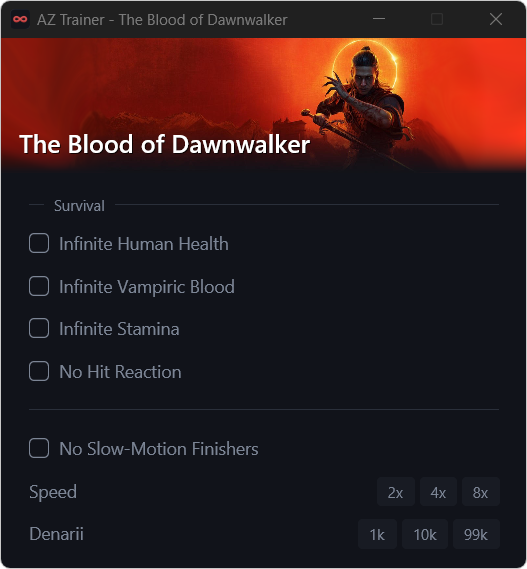
Supported games
Each game is supported by a dedicated, open script. New titles and fixes are delivered automatically, with no reinstall required.
- Onimusha: Way of the Sword
- The Blood of Dawnwalker
- Resonance: A Plague Tale Legacy
- 007 First Light
- Dragon Age: The Veilguard
- Black Myth: Wukong
- A Plague Tale: Requiem
- A Plague Tale: Innocence
How it works
No installer and no configuration. Three steps from download to play.
Download
Save az_trainer.exe to a folder of its own. On first launch it retrieves the latest game scripts.
Launch your game
AZ Trainer identifies the running game and its version, then attaches automatically.
Choose your options
Enable options from the window or with global shortcuts. Closing the trainer reverts every change.
Windows SmartScreen warning. On first launch Windows may report that Microsoft Defender SmartScreen prevented an unrecognized app from starting. AZ Trainer is not code-signed, so new releases have not yet built up download reputation. Select More info, then Run anyway. To confirm the file is genuine, compare Get-FileHash az_trainer.exe with az_trainer.exe.sha256 on the release page.
Features
Small by design, transparent by default, and careful with your game.
Version-aware detection
Recognises the running game and its exact build, and never modifies a version a script was not written for.
Global shortcuts
Toggle options with hotkeys such as Alt+F1, confirmed by a brief on-screen notice in game.
Automatic updates
New releases, newly supported games and fixes are installed in the background.
Saved preferences
Your selections are remembered for each game and restored the next time you play.
Full transparency
The active script's update date, checksum and source are shown right in the trainer window.
Open and extensible
Every game is a single, readable JavaScript file. Contributions are welcome — see the developer guide.